Edit the highlighted input cells; calculated results update automatically.

What's inside

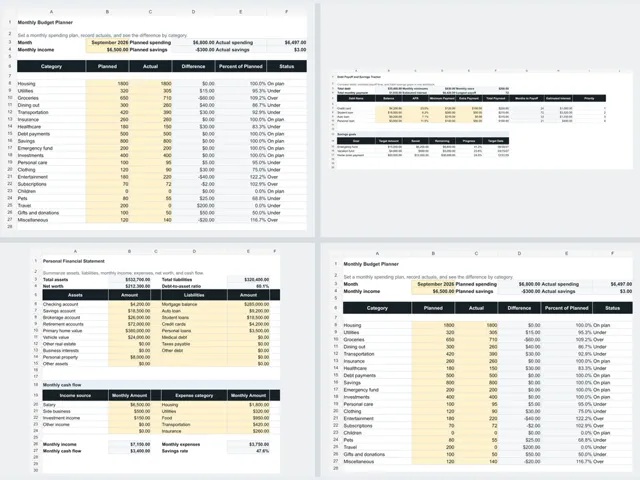
  • Monthly income input and twenty household spending categories
  • Planned versus actual amounts with automatic differences
  • Percent-of-plan and on-plan, under, or over status for every category
  • Automatic unassigned amount and savings-category totals (Savings, Emergency fund, Investments)
  • Editable XLSX format for Excel and Google Sheets

Best for: Individuals and couples · Families tracking monthly spending · First-time budgeters

How to make a monthly budget in Excel

List dependable monthly income first, then add planned amounts for housing, utilities, food, transportation, debt, savings, and other recurring costs.

During the month, replace planned amounts with actual spending. The worksheet calculates the difference, the percent of plan used, and whether each category is on plan, under, or over.
Which monthly budget categories to include

Most households need housing, utilities, groceries, transportation, insurance, debt payments, health costs, personal spending, subscriptions, and savings.

Use categories that match how you actually make decisions. A shorter budget you update consistently is more useful than a detailed one that stays blank.

50/30/20 and zero-based budget methods

A 50/30/20 budget divides take-home pay into needs, wants, and savings. A zero-based budget assigns every dollar to a category until income minus planned spending equals zero.

This template is category-driven rather than locked to one method. You can combine categories and edit the labels to apply either approach.

Use in Google Sheets

Open a ready-made copy in Google Sheets, or keep the XLSX file for Excel.

Make a copy in Google Sheets

Made for practical spreadsheet work by the Digital Store team. Formulas and example values are checked against the downloadable workbook; updated October 7, 2026. Use the file as a planning aid and verify decisions with your own records or professional advisor where appropriate.

Worked example

September sample included in the workbook

Inputs

Monthly income
$6,500
Planned spending
$6,800
Actual spending
$6,497
Housing
$1,800 planned; $1,800 actual

Outputs

Unassigned (planned)
-$300
Unassigned (actual)
+$3
Savings categories planned
$1,400
Savings categories actual
$1,400
Groceries variance
-$60 (over plan)
Categories over plan
4 of 20

The sample month is illustrative. Replace the planned and actual amounts with your own figures.

Related free templates

View Personal Budgets
Free template libraries

Customer feedback

No reviews yet. Try the file and be the first to share how it worked for you.
Write a review

Download this file first to unlock review submission.

Your rating

FAQ

What is a monthly budget template?

It is a reusable worksheet for planning income and spending for one month, then comparing the plan with actual amounts. This template includes twenty editable spending categories and automatic differences.

Can I use the monthly budget spreadsheet in Google Sheets?

Yes. Download the XLSX file and import it into Google Sheets, or follow the import steps shown on this page. The formulas and input cells remain editable.

What should I include in monthly income?

Include take-home pay and other dependable monthly income. For variable income, use a conservative baseline or the lowest amount you expect to receive.

Does the template support a zero-based budget?

Yes. You can edit the category labels and planned amounts until total income minus total planned spending equals zero.

What does unassigned mean in the budget spreadsheet?

Unassigned is monthly income minus the total planned or actual category amounts. A positive number is money not yet assigned to a category. It is separate from the savings-category total, which adds Savings, Emergency fund, and Investments.

Questions? Contact us