 Featured
What's inside
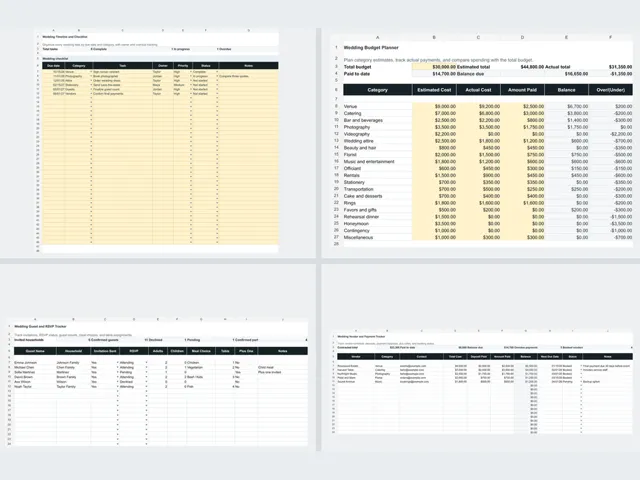
- Wedding budget
- guest and RSVP
- and vendor payment spreadsheets
Best for: Couples planning a wedding · Wedding planners · Event coordinators
Use in Google Sheets
This download is a ZIP of XLSX workbooks. Import each workbook into your own Google Sheet to use it there.
- 1. Download the file, then opensheets.new.
- 2. In Google Sheets, choose File > Import > Upload.
- 3. Select Replace spreadsheet, then edit the yellow input cells.
Made for practical spreadsheet work by the Digital Store team. Formulas and example values are checked against the downloadable workbook; updated October 7, 2026. Use the file as a planning aid and verify decisions with your own records or professional advisor where appropriate.
Related free templates
View Event PlanningFeaturedCustomer feedback
No reviews yet. Try the file and be the first to share how it worked for you.
Write a review
Download this file first to unlock review submission.
FAQ
Is the sample free?
Yes. The base workbook or pack shown on this page can be downloaded without payment, an account, a credit card, or an email address.
What software do I need?
The product is supplied as an editable spreadsheet or pack designed for Microsoft Excel and Google Sheets.
Can I edit it?
Yes. Inputs, labels, categories, and sample records can be changed in your spreadsheet app. Formulas are intended to remain intact when you replace the example values.
What does the Wedding Planning Spreadsheet Pack help me do?
Three coordinated Excel planners for wedding budgets, guest and RSVP tracking, and vendor payments. It includes wedding budget.
Is this a subscription?
No. The current download is free and does not create a recurring subscription, account, or payment obligation.
Which wedding & events workflow does it support?
It is organized for the event planning workflow and can be adapted to your own categories or process.