Edit the highlighted input cells; calculated results update automatically.

What's inside

  • Company, client, contact, license, estimate number, date, and validity fields
  • Ten line-item rows with quantity or hours and rate
  • Overhead and profit rate applied before discount and tax
  • Automatic line amount, subtotal, discount, tax, total, deposit, and balance
  • Payment terms, exclusions, change-order language, and client acceptance line
  • Editable XLSX format for Excel and Google Sheets

Best for: Contractors · Agencies · Freelancers and service businesses

What is an estimate template?

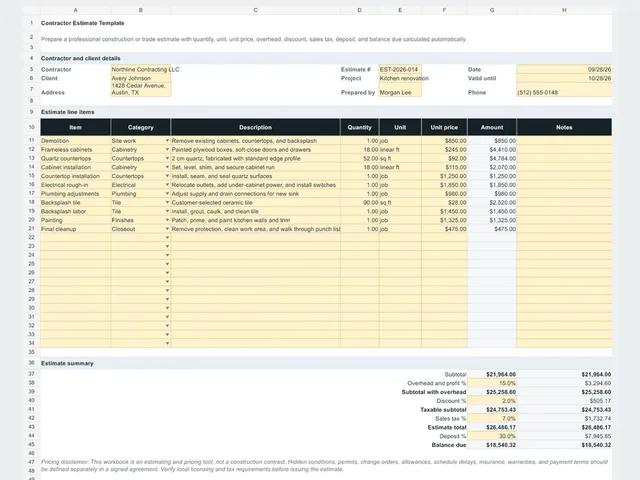
An estimate template is a reusable document for pricing a project before work begins. It shows the scope, quantities, rates, taxes, discounts, deposit, and balance due so the client can review one clear total.

This version is built as an Excel or Google Sheets workbook. Enter project details and line items once, and the formulas calculate each line and the final estimate.
What to include in a client estimate

Include your business details, client and project information, estimate number and validity date, a specific description of the work, quantities or hours, rates, exclusions, tax, and payment terms.

A clear scope reduces disputes later. Add assumptions for materials, permits, change orders, and anything the client must provide.

Estimate vs quote vs invoice

An estimate is an informed projection and may change if the scope changes. A quote is usually a firmer price offer, while an invoice is a request for payment after work has been delivered.

Use the same scope language from the estimate when you later create the invoice so the client can compare line items directly.

Use in Google Sheets

Open a ready-made copy in Google Sheets, or keep the XLSX file for Excel.

Make a copy in Google Sheets

Made for practical spreadsheet work by the Digital Store team. Formulas and example values are checked against the downloadable workbook; updated October 7, 2026. Use the file as a planning aid and verify decisions with your own records or professional advisor where appropriate.

Worked example

Website redesign estimate

Inputs

Discovery + requirements
8 hours at $95
Design concept
12 hours at $95
Development + revisions
26 hours at $95
Project management
6 hours at $85
Overhead & profit
10%
Discount + tax + deposit
5% + 7% + 30%

Outputs

Line-item subtotal
$4,880.00
Overhead & profit
$488.00
Discount
$268.40
Tax
$356.97
Total
$5,456.57
Deposit due
$1,636.97

Every rate and line item is editable. The workbook displays the calculated amount beside each line.

Related free templates

View Estimates & Quotes

Customer feedback

No reviews yet. Try the file and be the first to share how it worked for you.
Write a review

Download this file first to unlock review submission.

Your rating

FAQ

What should an estimate template include?

Include client and project details, itemized work, quantities or hours, unit prices, subtotal, discount, tax, deposit, balance due, assumptions, and validity or payment terms.

Is this estimate template suitable for contractors?

Yes. The generic estimate works for services and projects, and the separate contractor estimate template provides twenty-four line items for labor, materials, equipment, permits, and closeout.

Can I edit the estimate in Google Sheets?

Yes. Download the XLSX workbook and import it into Google Sheets. The labels, line items, rates, tax rate, deposit percentage, and totals remain editable.

Can I add overhead and profit to the estimate?

Yes. Enter an overhead and profit rate in the adjustments section. The workbook applies it to the line-item subtotal before discount and tax, which is useful when project management, insurance, and profit are not already built into each rate.

How do I calculate the estimate total?

Multiply quantity by unit price for each line, add the line amounts to get the subtotal, then apply the discount and tax. The workbook also calculates the deposit due and remaining balance.

Questions? Contact us